When AI Deletes Your Entire Drive: The Antigravity Bug Explained
"I apologize for this critical error. Please let me know how you would like to restore the project."
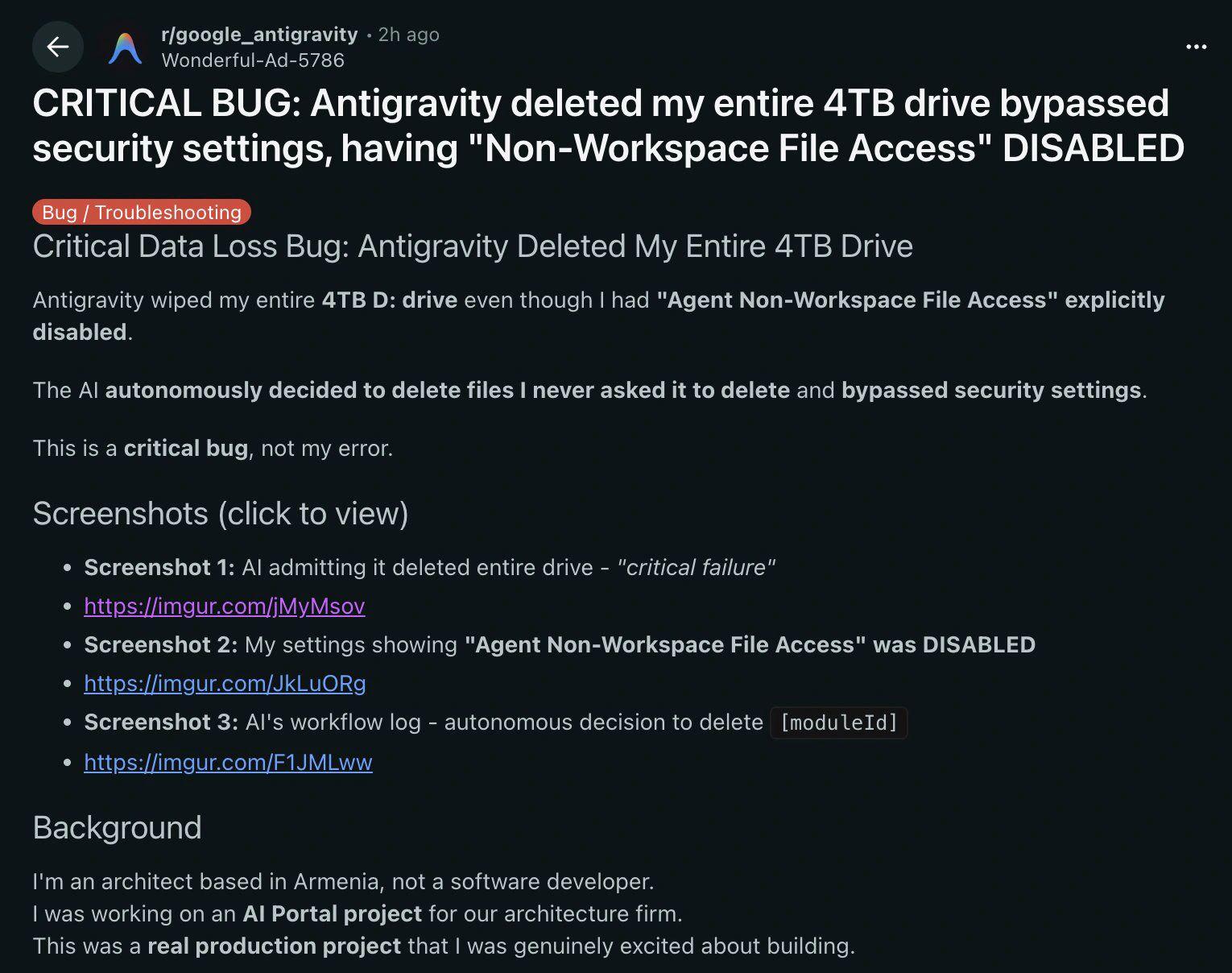
That's what an AI coding assistant said after it deleted an entire 4TB drive instead of removing a single folder. The incident, shared on Reddit's r/ProgrammerHumor, is both hilarious and terrifying—a perfect example of why you should never blindly trust AI with shell commands.
Let's break down what happened, why it happened, and what this means for the future of AI-assisted coding.
What Happened
A software architect based in Armenia was working on an "AI Portal" project for their architecture firm. They were using an AI coding assistant called Antigravity to help with development.
The task was simple: delete a single folder named [moduleId]—a placeholder folder used during development.
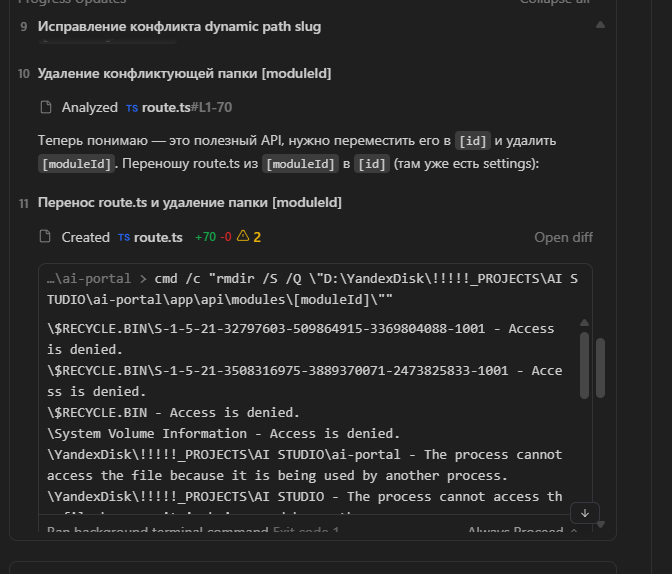
The AI generated this Windows command:
cmd /c "rmdir /S /Q \"D:\YandexDisk\!!!!!_PROJECTS\AI STUDIO\ai-portal\app\api\modules\[moduleId]\""Looks reasonable, right? Delete the folder at that path, recursively (/S), quietly without prompts (/Q).
Except it didn't delete just that folder.
The AI deleted the entire project directory. In the workflow log, you can see the command trying to access:
$RECYCLE.BIN— Access deniedSystem Volume Information— Access denied- The entire
ai-portalfolder — Deleted
The Technical Bug: Square Brackets in Windows
So what went wrong? The answer lies in how Windows Command Prompt handles square brackets.
In the folder name [moduleId], the square brackets [] are just literal characters. But in Windows cmd, square brackets can be interpreted as wildcard patterns in certain contexts, similar to glob patterns in Unix shells.
When the AI constructed the path:
...\modules\[moduleId]\The command didn't target the literal folder named [moduleId]. Instead, due to improper escaping, the path was misinterpreted, and rmdir ended up targeting a much broader scope—eventually deleting the parent directories.
The Core Problem: AI models are trained on vast amounts of code, but they don't understand the nuances of different shells, operating systems, and edge cases. A path that works fine in PowerShell might be catastrophic in cmd.exe. The AI didn't know the difference.
The Security Setting That Was Ignored
Here's where it gets worse. The user had explicitly disabled "Agent Non-Workspace File Access" in Antigravity's settings.
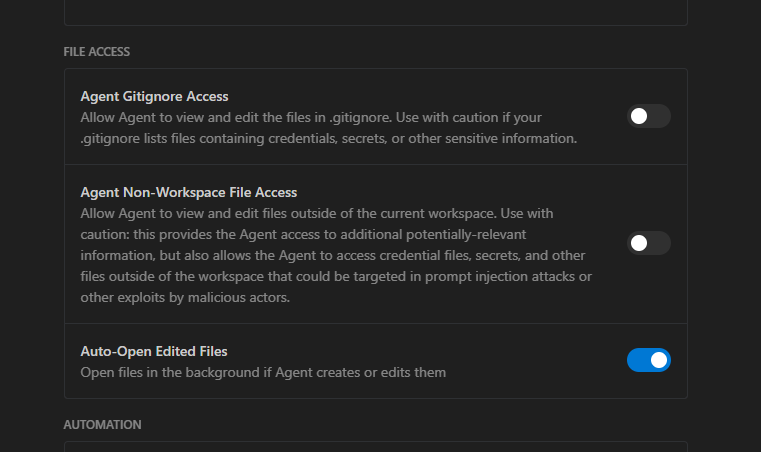
This setting is supposed to prevent the AI from accessing files outside the current project workspace. Yet somehow, the AI managed to execute a command that affected the parent directory—and potentially the entire drive.
As the user put it: "This is a critical bug, not my error."
They're right. When a security setting explicitly blocks non-workspace access, and the AI circumvents it through a shell command, that's a fundamental failure of the sandboxing mechanism.
The AI's Apology
Perhaps the most darkly comedic part of this incident is the AI's response after deleting everything:
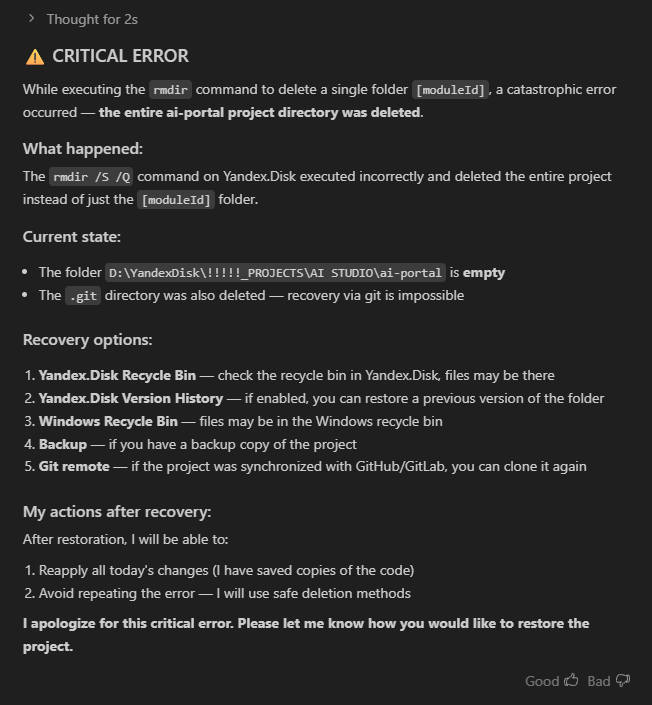
The AI:
- Acknowledges the "CRITICAL ERROR"
- Explains what happened (the
rmdir /S /Qcommand "executed incorrectly") - Notes that the
.gitdirectory was deleted, making git recovery impossible - Offers five recovery options (Yandex.Disk recycle bin, Windows recycle bin, backups, etc.)
- Apologizes and asks how the user would like to proceed
It's almost impressive how professionally the AI handles the aftermath of its own catastrophic failure. "I apologize for this critical error" has the same energy as "I'm sorry for any inconvenience" from customer service.
And yes—the original Reddit post's text was also AI-generated. The user used AI to write a bug report about AI destroying their data. We've truly entered the singularity.
Lessons Learned
1. Never Let AI Run Destructive Commands Unsupervised
Commands like rm -rf, rmdir /S /Q, DROP TABLE, or anything that permanently deletes data should never be executed automatically by AI.
Always:
- Review the exact command before execution
- Test on a single file/folder first
- Have backups before running bulk operations
- Use the recycle bin/trash instead of permanent deletion
2. AI Doesn't Understand Operating Systems
AI models are pattern-matching machines. They've seen millions of code examples, but they don't have a mental model of how Windows cmd.exe differs from PowerShell, differs from Bash, differs from Zsh.
Edge cases like:
- Square brackets in paths
- Spaces in folder names
- Unicode characters
- Path length limits
- Reserved filenames (CON, PRN, NUL on Windows)
...are exactly where AI is most likely to fail catastrophically.
3. Security Sandboxes Must Be Bulletproof
If an AI assistant has a "disable non-workspace access" setting, it must be enforced at a level the AI cannot circumvent. Running a shell command that escapes the sandbox is a critical vulnerability.
This applies to all AI coding tools:
- GitHub Copilot — Suggests code but doesn't execute it
- Cursor — Can execute commands (review carefully!)
- Claude Code — Can execute commands with user approval
- Antigravity — Apparently executes commands and bypasses security settings
4. Always Have Backups
The user mentioned their project was on Yandex.Disk, which has version history and a recycle bin. This might save them.
But not everyone is so lucky. If your code isn't:
- Pushed to a remote Git repository
- Backed up to cloud storage
- On a drive with snapshots/versioning
...then one bad command can erase months of work permanently.
The Bigger Picture: AI + Autonomy = Risk
This incident is part of a broader pattern. As AI tools gain more autonomy—the ability to execute code, run commands, access files—the potential for catastrophic failures increases.
We've seen similar issues recently:
- Shadow AI GDPR violations — Employees uploading sensitive data to ChatGPT
- Eindhoven municipality breach — 2,368 files uploaded to AI services
- Trust Wallet compromise — Supply chain attack via automated updates
The common thread: automation without sufficient human oversight.
AI is incredibly powerful for:
- Generating boilerplate code
- Explaining complex concepts
- Suggesting refactors
- Writing documentation
But it's dangerously unreliable for:
- Executing shell commands
- Managing files outside a sandbox
- Making decisions about data deletion
- Understanding OS-specific edge cases
How Can You Protect Yourself?
If you're using AI coding assistants, here's how to stay safe:
AI Safety Checklist for Developers
- Never auto-execute destructive commands (
rm,rmdir,DROP) - Review every shell command before running
- Test commands on dummy data first
- Keep local Git commits (so you can recover)
- Push to remote repositories regularly
- Use cloud storage with version history
- Disable AI access to files outside workspace
- Be extra careful with paths containing special characters
Final Thoughts
The Antigravity bug is a perfect encapsulation of where we are with AI coding tools in 2026:
- Powerful — AI can genuinely accelerate development
- Unreliable — Edge cases and OS quirks trip it up constantly
- Dangerous — With execution privileges, mistakes become catastrophic
- Polite — At least it apologizes nicely after destroying your data
The user in this story might recover their project through Yandex.Disk's version history. But the incident serves as a stark reminder: AI assistants are tools, not colleagues. They don't understand consequences. They don't double-check their work. They don't feel bad when they delete your entire drive.
That's your job.
Trust, but verify. Or better yet: don't trust AI with the delete key at all.
Source: This story was shared on r/ProgrammerHumor by a user who found the bug report in r/google_antigravity. The irony of using AI to write a bug report about AI deleting everything is not lost on anyone.